Send every customer a weekly outcomes recap

Overview
The value your customers get is realest to them when someone tells them about it. But nobody has time to write a personalized “here’s what your team accomplished this week” note for every account — so the wins pile up silently, and the first time renewal comes up, the customer can’t remember why they signed.
The Weekly Outcomes agent closes that gap. Every week, it writes each of your customers a personalized recap of the outcomes they drove — grounded in their actual product usage — and hands it to your CSM as a ready-to-send draft.
What it does
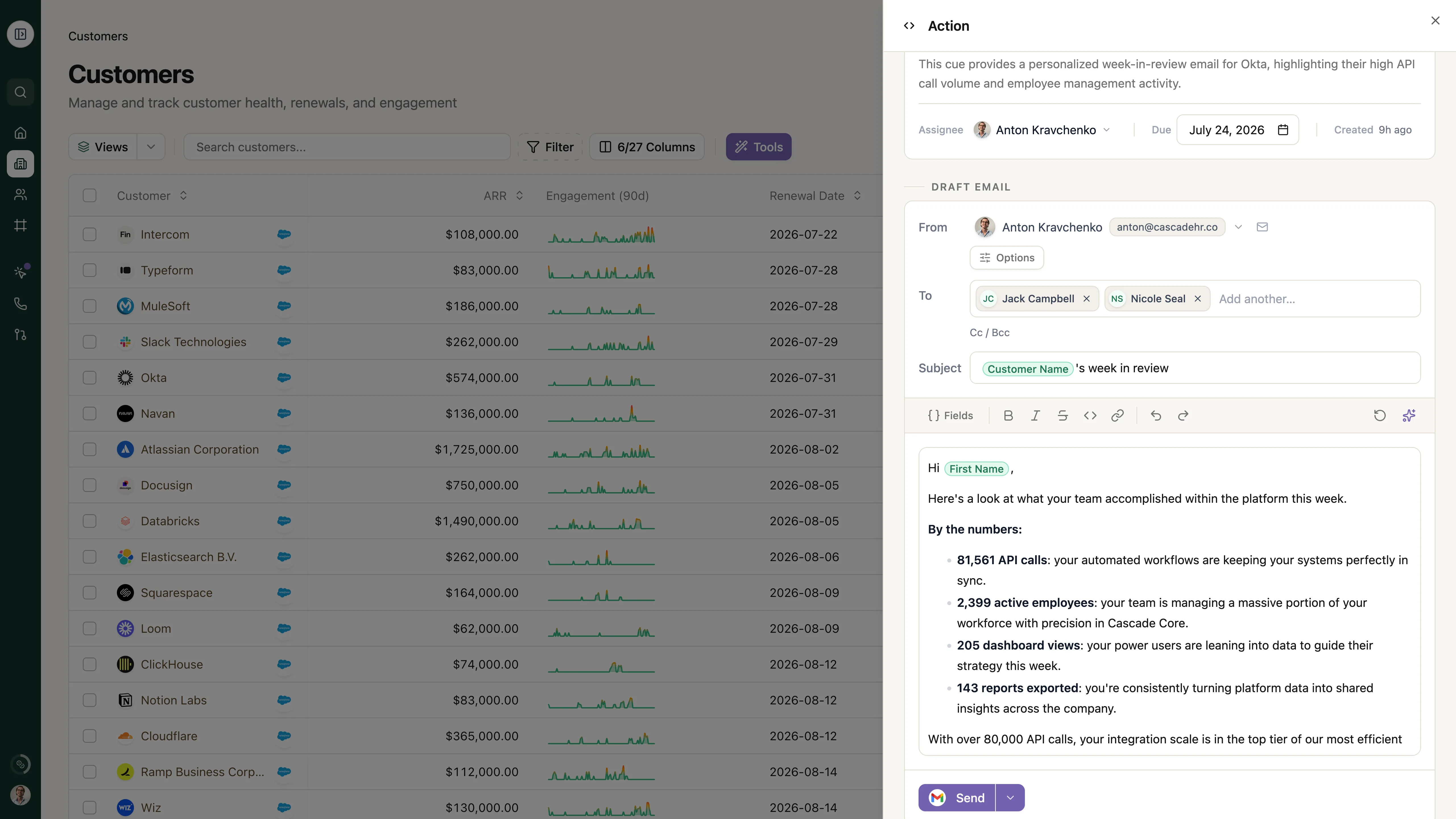
Once a week, the agent runs across your entire book. For each customer, it pulls their real usage over the past week and composes a short, celebratory recap in the spirit of a Spotify Wrapped:
- By the numbers. Three or four highlights, each a bold metric paired with a plain-English sentence — “2.8M API calls: your integrations are working overtime,” “45% more active users: the team is leaning in.”
- A standout callout. The single most impressive number, called out on its own.
- A soft close. A calendar link and a “what’s new” link, signed by the account’s owner.
Because it reads from the same customer knowledge graph as everything else in Sonora, the numbers are real and current — not a stale export someone pasted in.
Your team stays in the loop
This isn’t a firehose of auto-sent email. The agent runs in review mode: each recap lands as a draft in the assigned owner’s queue, so your CSM can skim it, adjust the tone, and send when it’s right. You get the leverage of a per-account writer without giving up the relationship.
Why this matters
Outcomes that go unspoken don’t renew accounts. A steady, personalized signal of value — every week, in the customer’s own numbers — turns quiet usage into a story your champion can forward to their boss. And because it’s automated, the smallest accounts in your book get the same attention as the biggest.
Get started
The Weekly Outcomes agent ships as a playbook template. Open the Playbooks panel on your Customers table, add the Weekly outcome summary template from the gallery, and turn it on. It’s scheduled to run weekly out of the box — adjust the cadence, recipients, and copy to fit your team, then let it work.